Let's say you wanted to open Safari. There are an infinite number of ways you could do this: if you've got Safari saved on your dock, you can simply click on it; you could navigate to the App Library and launch it from there; you may have Safari on the 4th page of your home screen; or you could launch Spotlight, quickly type in "Saf", which would queue Safari as your first suggestion, and press Enter. All of these achieve the same goal, but it's purely personal preference on how users like to engage with their devices. To some people, that extra 1–2 seconds it takes to find an app can cost them a lot over time.
Looking into someone's iPhone or MacBook can tell you a lot about them: how cluttered or minimal their desktop may be, which apps are on their dock, how they have their menu bar configured, how many tabs they have open. They say the eyes are the window into the soul. You can interpret that however you'd like for someone's computer or phone, but I find it incredibly interesting to look at people's devices and learn how unique everyone's workflows are.
Your home screen says a lot about you
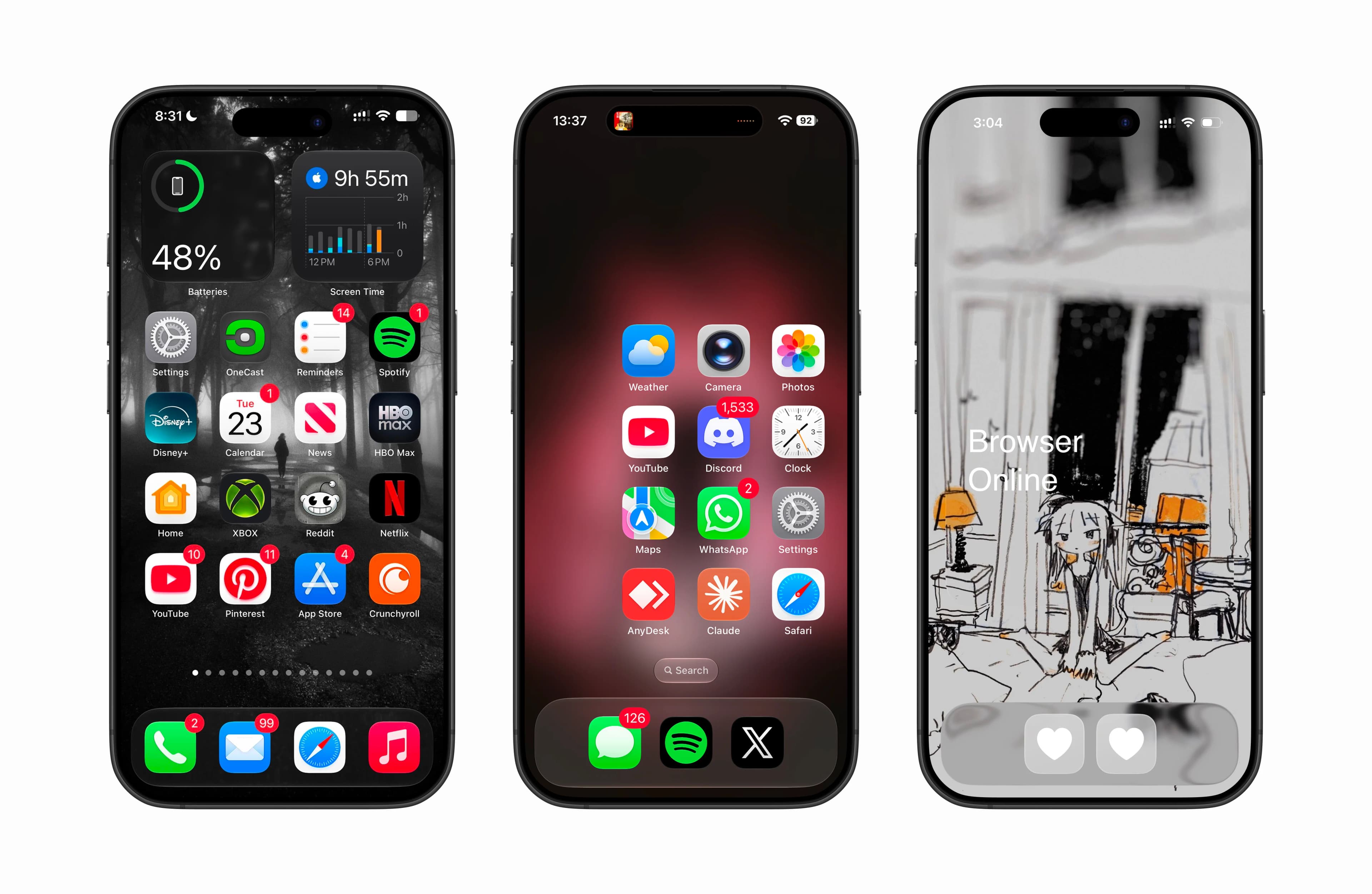
If you had to choose, which iPhone home screen below would you enjoy using the most? The first option is a library of pages that have all of your apps and two widgets on the home screen for battery life and Screen Time. The middle option is optimized for right-handed users, where all of the main apps are accessible for your thumb and any other app is a quick drag down away from launching Spotlight, and the final option is a home screen that heavily relies on Spotlight to launch apps.
I think a home screen is a cheat code into quickly learning [assuming] how someone uses their phone.
That's why these three phones feel so different. The leftmost is built for browsing by page, the middle is a bit of a compromise, where a handful of apps that I use every day are within reach of my thumb and any other app is a quick tap of search or drag of the screen to initiate Spotlight, and the final page is as minimal as it can get and heavily relies on Spotlight to launch apps.
What I'm getting at here is that there is no single correct way for someone to use their phone to navigate; it's entirely personal. This is a deeper look into how a feature like Spotlight can change the way that we navigate through our devices.
History
Spotlight is a search utility within Apple's operating system that allows users to quickly launch apps, find messages, search the web, and more. It was introduced in 2009 with the release of iOS 3.
Fundamentally, Spotlight has remained the same since its first release: a center point within the iPhone where users can launch anything they need. Looking at the UI changes over the years shows all the tweaks and small adjustments Apple has taken in terms of suggesting specific intentions behind Spotlight. iOS 7 and 9 pre-populated the Spotlight UI with suggestions, whereas iOS 6 left the search results up to the direction that the user wants to take rather than forcing the suggestions. iOS 17 had this approach as well, and in iOS 27, the Spotlight bar shifted into the Dynamic Island.
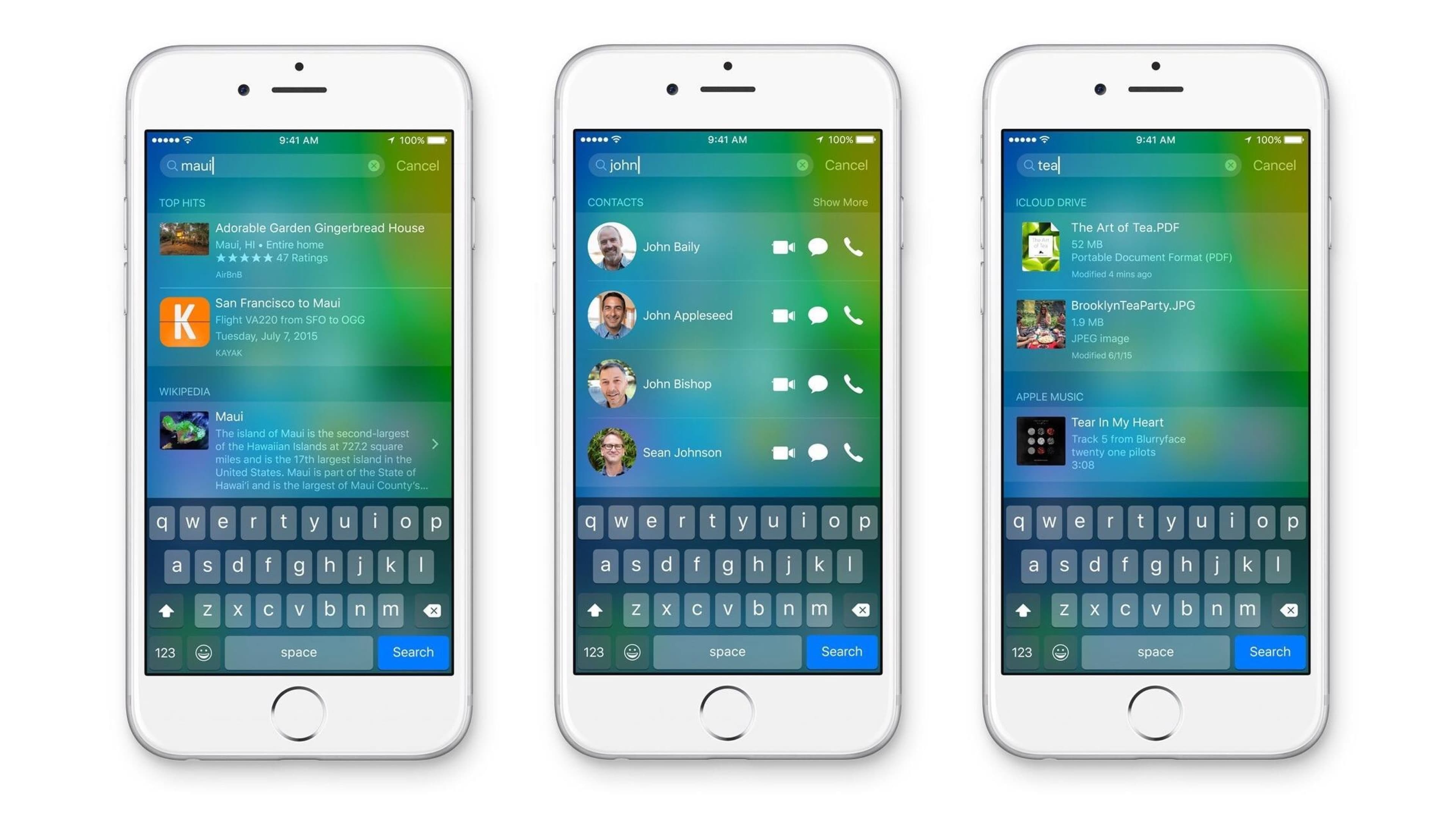
The new Spotlight trigger in iOS 27 is nice eye candy, but I can't help but think about user knowledge. Up until iOS 26, people learned the traditional search, where the search pill on the home screen morphs into the input field. Now Apple has shifted a core feature up into the Dynamic Island, which is really just a clever software workaround for the notch on the iPhone.
Seeing as though the iPhone Duo has a hole-punch cutout for the camera (since there's no Face ID) and the iPhone 18 Pro has shifted the LiDAR sensor under the screen to make the Dynamic Island smaller, I can only assume that one of Apple's next innovations within the coming years is shifting the entire front camera module under the display, eliminating the need for the Dynamic Island and rendering this new iOS 27 version of Spotlight obsolete.
And since the iPhone Duo just released, of course we have to take a look at how Spotlight renders on it. Without a front notch, we have that traditional Spotlight animation, where our search input comes from below. As pleasing as the Dynamic Island eye candy animation is, cementing one type of interaction between devices would prevent Apple from having to move Spotlight from the Dynamic Island back to its traditional form in years to come.
The Duo also makes something obvious: phones keep getting larger. Most current phones are already too large for someone's thumb to reach all ends of the screen. Expanding the iPhone into its folding layout makes it mandatory to use two hands in order to navigate it. One of the workarounds with this in Spotlight is top results and the Enter key.
Speed, ease of use, and workflows
Navigating purely with Spotlight needs to be fast. When I first started using Spotlight on iOS, I didn't know you could just press the Enter button immediately after enough letters are typed to get the app you want. For example, if I want to open Music, typing in "Mus", or even just the letter M depending on how you look at it, is enough to trigger that app as my first default M search. Then I can click/spam the Enter button to launch the app. Much quicker than typing in Music fully and moving my thumb to press the first app.
⌘ + Space launches Spotlight on Mac. This is a very natural keybind to trigger something like Spotlight since your thumbs are typically within reach of these two keys 90% of the time.
Similar to iOS, you can pre-click Enter depending on what application you are searching for. If it's a highly used app, the indexing will keep this at the forefront of your search query and it will always be the first suggestion. Mac's Spotlight is a bit more powerful than on iOS, since you can go through your applications, files, actions, and clipboard using the ⌘ + number keys as well. If you know all of the shortcuts around this, navigating through is incredibly fast.
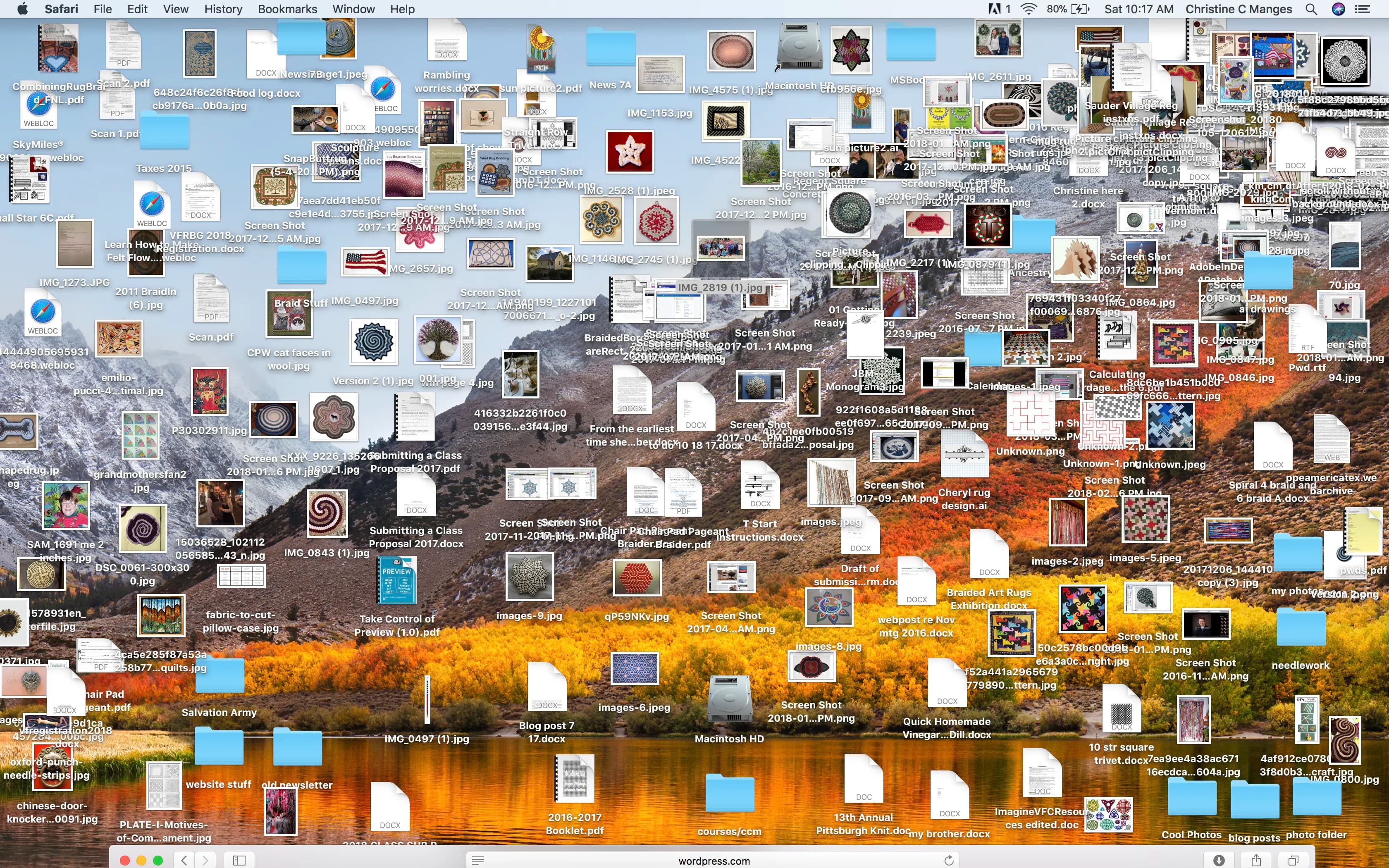
Remember when I said you can tell a lot about a person based on their iPhone home screen? I believe the same thing applies for someone's desktop and dock. I personally prefer the dock at a very small size with no magnification. Similar to my phone home screen, the main apps that I use are front and center, where the others are a Spotlight launch away. I also keep a single folder on my desktop with nothing else. Sometimes, if I am working on a new project, there will be tons of files all over my desktop, but that's typically temporary.

I've seen my fair share of cluttered desktops like this. It may work for some people, but I don't think I could handle it.
It's not perfect
Everything has flaws, and Spotlight is no exception. Sometimes I will search for "appearance" to change my theme, and I'll get something completely random. Another one I notice a lot is Bluetooth. Searching "Bluetooth" doesn't put me in the statistical number-one spot that people would go to turn off or disconnect a device. It will throw me in Bluetooth File Exchange. I've seen plenty of tweets criticizing the indexing in newer versions of macOS.
 Peer Richelsen@peer_richi recently out of jokes installed OS X Lion and the search for settings was amazing
remember when it would highlight where things were???
weve gone backwards so much
Peer Richelsen@peer_richi recently out of jokes installed OS X Lion and the search for settings was amazing
remember when it would highlight where things were???
weve gone backwards so much Drew Bradshaw@faithson77I really wish Apple would allow me to launch my MacOS apps with the Launchpad instead of Spotlight. Spotlight never launches my apps. It either tries to launch the iOS app via iPhone Mirroring, or it cannot find it at all. Grr. That now having to pay for the iWork apps is ticking me off.
 AppleLeaker@LeakerAppleI hate the new Spotlight UI in macOS Golden Gate. It doesn't feel as responsive as the one in Tahoe.
Also, they haven't fixed the broken app search issue in Beta 1 yet.
AppleLeaker@LeakerAppleI hate the new Spotlight UI in macOS Golden Gate. It doesn't feel as responsive as the one in Tahoe.
Also, they haven't fixed the broken app search issue in Beta 1 yet. Samay@SamaytwtThis is how Apple search engine works btw.
 Paul Solt@PaulSoltMac Spotlight search sucks.
Being locked to the first result
A constant pain point that a friend and I noticed was that if you have two apps with similar names and you use the Enter key to trigger your search result, you're always bound for the first item. So, if you have both YouTube and YouTube Music, rather than being able to type "You" and quickly press Enter, you would have to finish typing YouTube and add "M" at the end to make the music app your first result.
Spotlight's results are not ordered alphabetically; they are ranked on your device based on how often you open each app and how much time you spend in it. Results are generally guaranteed to give you the statistically correct result at the top. Back to the YouTube thing, if your YouTube Music usage outweighs your regular YouTube usage, then it would appear first in the results. Most of the time, the tradeoff of quickly pressing Enter before your results even populate is a deliberate one: you're prioritizing speed over choice, and most of the time it's the correct one.
But when it's not, I wanted to build a way to pick other results in Spotlight without having to use two hands or readjust my grip (I'm looking at you, Pro Max users). A physical demo that I could test in real time and use on my own phone would allow me to test this theory out.
The idea comes as a blend between tvOS and the cursor selection that you find on iPadOS when using a case with a trackpad. The cursor turns into a magnetic link, guiding itself along the selectable elements within the UI.
The state is triggered by long-pressing on the Return key and slightly shifting your thumb to give you more scrolling room. Then the keyboard area turns into a small trackpad, so you can quickly move between the four top-hit app options, or even drag up and down to reach web searches and more.
Originally, I thought to add this to the already-present spacebar interaction, where users can long-press the spacebar in order to move the typing cursor between letters. A slight drag up would move the selection from a cursor within a text field to how it is in the current version. This is already a familiar pattern, but it quickly overcomplicated things. I ended up resorting to the Return key, as your thumb is typically already there (you right-handers out there) when navigating Spotlight.
Three letters and Enter
In the end, despite all the redesigns, Spotlight's core pattern hasn't really changed since iOS 3. The goal is still the same: let you find what you want as fast as possible. If you look back at the three home screens towards the start of this post and compare them to yours, which one are you closest to? And do you think your thoughts towards Spotlight have shifted at all? Just remember that any app is one, two, or three letters and an Enter key away.